Finding email and phone
Talin finds verified emails and phone numbers for your contacts, either for a whole campaign at once or for a single LinkedIn profile. Talin pulls from six or more verified data providers with real-time validation, and only uses credits when it finds what you asked for.
Credits
Section titled “Credits”Each successful find uses credits:
| What Talin finds | Credits |
|---|---|
| Business email | 1 |
| Personal email | 3 |
| Cellphone number | 6, which also includes any business or personal email found at the same time |
Enrich contacts in bulk
Section titled “Enrich contacts in bulk”Bulk enrichment covers a full campaign of imported contacts in one pass.
- Create a campaign and import your contacts.
- Choose your enrichment options: full enrichment (email and phone), work only, or personal only.
- Select the enrich button, for example Enrich 5 contacts.
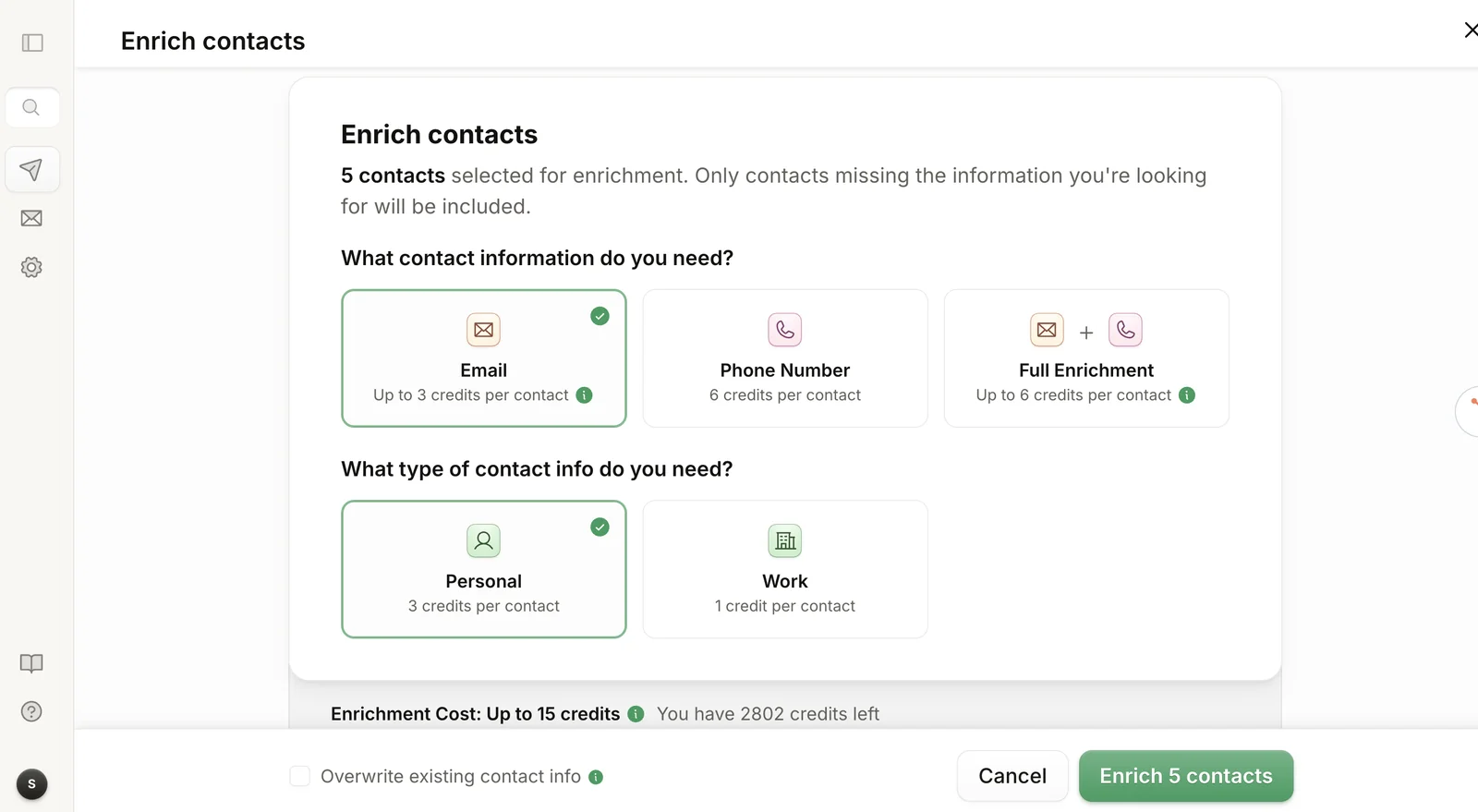
Only contacts missing the information you’re looking for are included.
How long it takes:
- 1 to 50 contacts: 2 to 7 minutes
- 51 to 200 contacts: 7 to 15 minutes
- more than 200 contacts: 15 to 30 minutes
Enrich contacts in an existing campaign
Section titled “Enrich contacts in an existing campaign”You can also enrich contacts in a campaign you’ve already created. This video shows how.
Enrich one profile from the Chrome extension
Section titled “Enrich one profile from the Chrome extension”Use the Chrome extension to enrich a single LinkedIn profile without importing a full list.
- Open the person’s public LinkedIn profile.
- Open the Talin Chrome extension.
- Select Enrich.
Verified emails and direct dials appear in the extension.
Re-enrich a bad email or phone number
Section titled “Re-enrich a bad email or phone number”If an email bounced or a number didn’t connect, you can flag the bad contact info and have Talin take another shot at finding the right one. Re-enrichment is free and doesn’t use any credits.
What it does
Section titled “What it does”Re-enrichment removes bad contact info from your campaigns and looks for a replacement. When you report an email or phone number as incorrect, Talin:
- Reports it as incorrect, so it’s never used again in your campaigns.
- Re-runs enrichment across its data providers to look for a replacement.
It uses the same data providers as enrichment, so you get a genuine second pass, not a repeat of the first result.
Re-enrich in the Talin app
Section titled “Re-enrich in the Talin app”- Open your campaign and find the contact.
- Select the three dots next to the email address or phone number.
- Select Report incorrect and re-enrich.
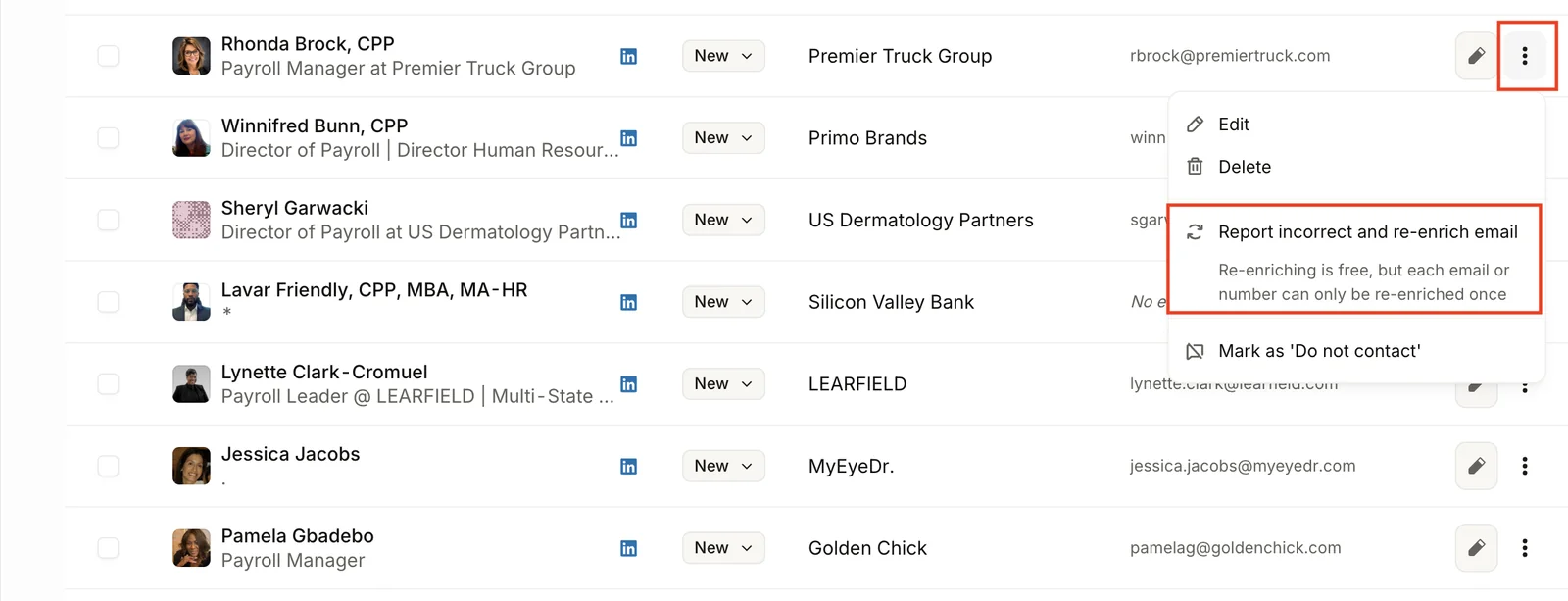
The old email or phone number is flagged immediately. If Talin finds a new one, it replaces the old one on the contact record and is ready to use in your sequence.
Re-enrich from the Chrome extension
Section titled “Re-enrich from the Chrome extension”The flow is the same when you’re working from a LinkedIn profile.
- Open the LinkedIn profile and open the Talin Chrome extension.
- Under Enrich for, select the three dots next to the incorrect email or phone number.
- Select Report incorrect and re-enrich.
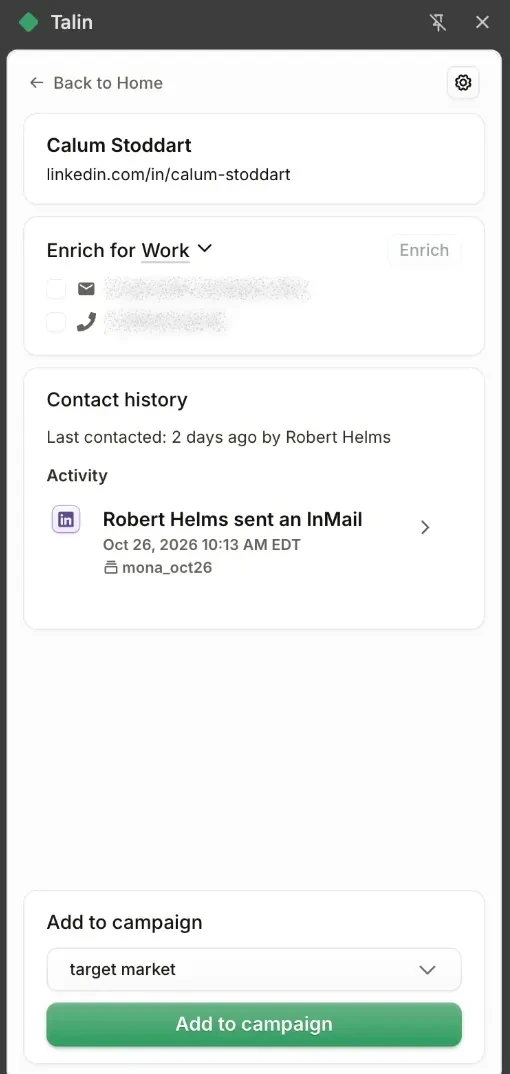
One attempt per contact
Section titled “One attempt per contact”Re-enrichment is a single shot. Once you’ve run it on a contact’s email or phone number, you can’t run it again on that same field.
If Talin can’t find a replacement, the old value stays flagged as incorrect and isn’t used in your outreach. Either way, the bad data is out of your campaign.
Why Talin’s enrichment works
Section titled “Why Talin’s enrichment works”Talin’s enrichment is built for staffing work:
- verified emails and direct dials, with every result checked by real-time validation before you’re charged
- the same data quality in bulk or individually, whether you enrich 500 contacts overnight or one prospect on a call
- up-to-date job titles and company info, since continuous data refresh catches job changes
- GDPR and CCPA compliant data, since every provider passes compliance checks before Talin routes data through it
- higher response rates for staffing agencies, because the provider mix is tuned for finding recruiters, hiring managers and candidates, not generic B2B leads
How the data waterfall works
Section titled “How the data waterfall works”Talin checks several providers in order rather than relying on one:
- Multi-source validation. Talin pulls from top-tier providers, not just one.
- Strict quality checks. Providers have to hit 95 percent email accuracy, real-time validation and compliance before they enter the stack.
- Tiered prioritization. The best providers are checked first, and backups fill gaps only when needed.
Frequently asked questions
Section titled “Frequently asked questions”Why not just use ZoomInfo or Apollo?
Talin tested more than 40 data providers and only kept the best. The data waterfall means contact info is accurate, current and enriched with the right details for staffing work: personal and business info, not just corporate contact data. A Talin subscription gives you access to the best providers underneath, so you don’t have to pick one and stick with it.
Still need help?
Our team is here when the docs don't cover it.