Frequently asked questions
Quick answers to the questions we hear most often. Where a full article covers the topic, the answer links to it.
Campaigns and sending
Section titled “Campaigns and sending”Why isn't my campaign sending?
Check these in order:
- Make sure the campaign status is set to Active.
- Check your contacts are enriched. Contacts need an email address for email outreach.
- Check your sending hours match your time zone.
- Check the campaign’s daily sending limit. Open the campaign and select the gear icon at the top right. New campaigns start at 10 a day per channel, so a large campaign moves slowly until you raise it.
- Check your email is connected in Connected Accounts.
- If the campaign has LinkedIn steps, check Actions on the campaign. LinkedIn steps are manual, so they wait until you send them.
Read more on daily sending limits.
Why are messages taking a while to send?
Talin deliberately varies sending times for email and LinkedIn to protect your accounts. Emails are always sent a few minutes apart, never in bulk, within your campaign’s sending hours. First messages should go out within 2 hours of the campaign’s send time.
I added contacts to a live campaign. Why haven't they started?
Talin queues the contacts that are in a campaign when you turn it on. Contacts you add later join on the next queue cycle, usually within a few hours, so nothing is stuck.
Talin also chooses each contact’s path once, when they enter the sequence: email if they have an email address, LinkedIn if they don’t. If you enrich a contact for email after that, they stay on the path they started on. To move them, add them to a new campaign.
Why are some contacts skipped with Message too long?
LinkedIn limits connection notes to 300 characters. A note can fit in the editor and still go over once a long name or company name is filled in. Shorten the note so it fits with your longest names.
Why can't I text a contact who replied STOP?
When a contact replies STOP, their mobile carrier blocks every later text from your Talin number to them, including replies you send by hand. These show as Failed to send. Reach them by email instead.
If I edit a campaign, will my changes take effect?
Changes apply to contacts who haven’t reached that step yet, and to contacts you add later. They don’t apply to contacts who already received that message.
Can I duplicate a campaign?
Yes, by saving it as a template. Open the campaign, open Settings and select Save as template. The template copies the sequence only: the message steps, their timing and any branching. It doesn’t copy contacts, sending limits or sending hours, so set those again in the new campaign.
How do InMails work?
InMails are a manual step. Talin writes the subject and message, and you send each one in LinkedIn Recruiter. Talin no longer opens Recruiter with the message already loaded, so you copy it from Talin instead.
- Open the InMail action on the campaign, or open the Talin Chrome extension on the contact’s Recruiter profile.
- Select Copy for the subject, then for the message, and paste each into the InMail in Recruiter.
- Select Send in Recruiter.
- Back in the extension, select Mark as completed.
Reply tracking stays automatic. Read more on outreach channels.
Can I send InMails in bulk?
Not from Talin. LinkedIn needs each InMail sent by hand. To save clicks, save the contacts waiting at the InMail step to a Recruiter project, send the InMails from that project in Recruiter, then select those contacts in Talin and select Move to Next Step.
LinkedIn steps and the Chrome extension
Section titled “LinkedIn steps and the Chrome extension”Talin works with LinkedIn in a LinkedIn-compliant way, to keep your LinkedIn account safe. These answers cover how LinkedIn steps and the Chrome extension work.
Why are my LinkedIn steps manual?
LinkedIn steps are manual so your LinkedIn account stays safe. Talin writes every connection request, message and InMail and lines up your contacts, and you send each one on LinkedIn with a quick copy and paste. Email and SMS are fully automated.
Read more on connection requests.
Why does the extension say Talin profile not available here?
The extension adds and enriches contacts from public LinkedIn profiles, not from LinkedIn Recruiter profiles. Open the person’s public LinkedIn profile instead (from Recruiter, go through to their public profile), then open the Talin extension there to enrich them or add them to a campaign.
Why does LinkedIn show as LinkedIn Notification in Connected Accounts?
This is expected. Talin reads LinkedIn’s email notifications to see when contacts reply or accept your requests, so it doesn’t need to log in to your LinkedIn account. Nothing is broken and you don’t need to reconnect. Read more on setting up LinkedIn reply tracking.
How do I build a list without AI Search Builder?
Use Talin search in the Talin app. Talin search finds people from Talin’s own data providers, so you don’t need LinkedIn Recruiter or Sales Navigator to build a list.
Will I lose my Talin data if I disconnect LinkedIn?
No. LinkedIn’s warning is about data in LinkedIn. Contacts, campaigns and messages already in Talin stay in Talin.
Lists and searches
Section titled “Lists and searches”How do I include or exclude a list of companies in Talin search?
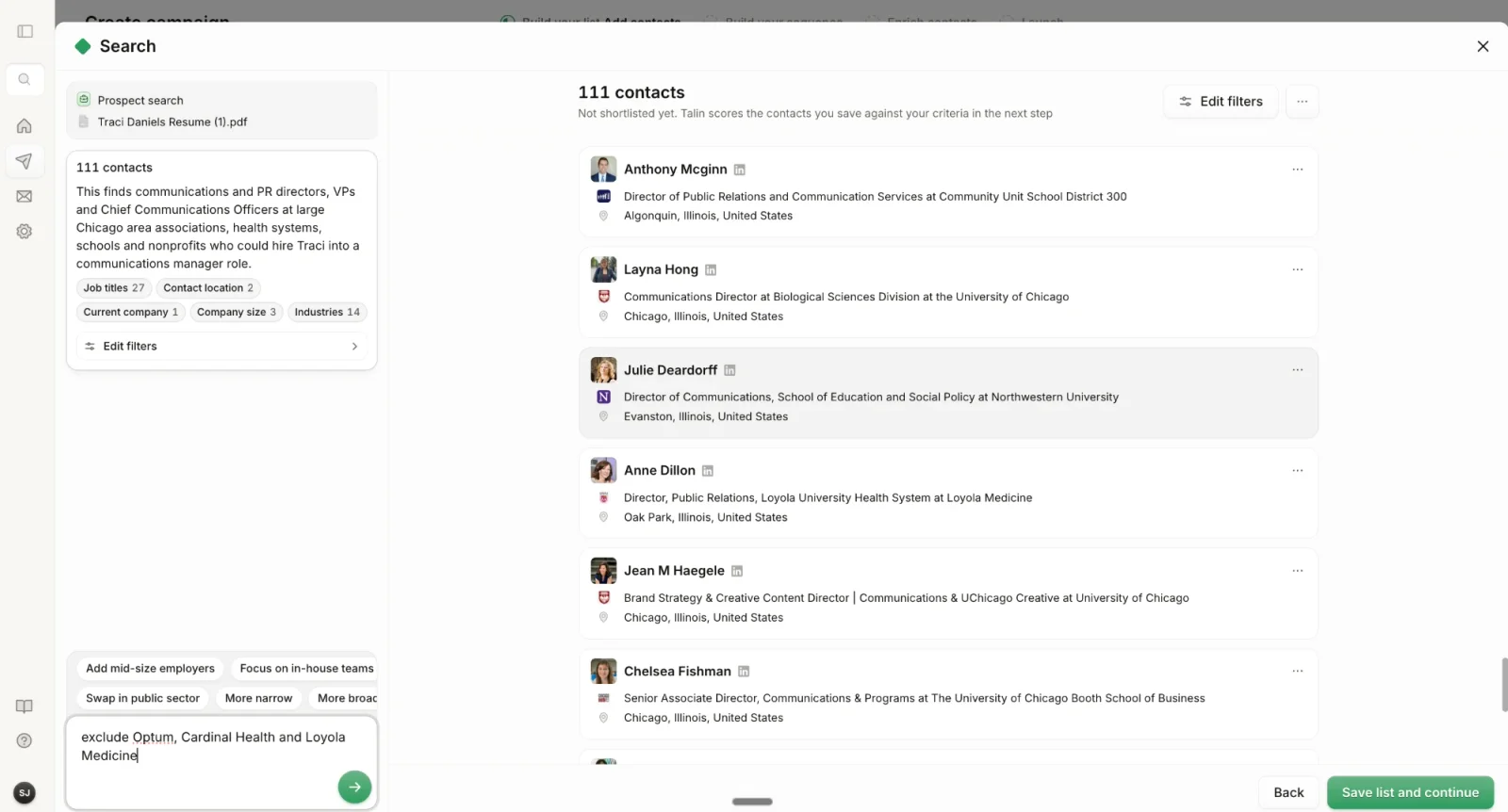
Excluding companies keeps people you shouldn’t contact out of your list, such as your existing clients. Including them lets you target specific accounts for account-based outreach.
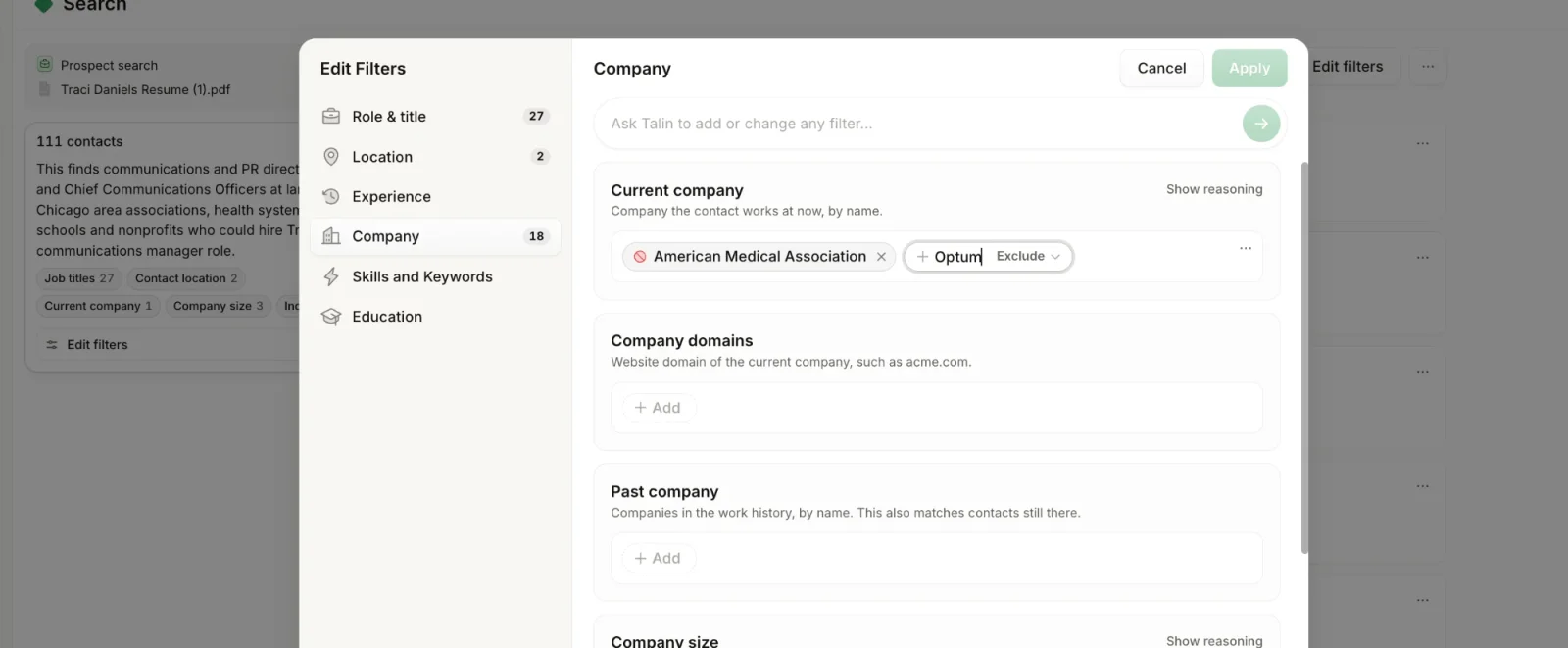
In Talin search, you can do this in the search chat or with Edit filters.
To use the search chat:
-
In the box at the bottom of the search chat, type Exclude.
-
Paste the companies you want to exclude, then send.
To use Edit filters:
-
Select Edit filters.
-
Go to Company and select Exclude.
-
Add the companies you want to exclude.
Credits and enrichment
Section titled “Credits and enrichment”When do my credits reset?
New credits are added each month on your billing date, not on the 1st of the month. Unused credits roll over, up to 4 months’ worth of your monthly allowance. Your next refresh date shows on your Profile under Contact Enrichment, and your billing date is in Settings, then Billing.
What does the free trial include?
The free trial isn’t time-limited. It includes one campaign and 250 credits. Credits are used by AI shortlisting and enrichment, so they can run out before you launch. Once you’ve built your trial campaign, starting another one takes you to Billing to choose a plan. Trial credits can’t be topped up. Read more on plans and credits.
Can I earn free credits?
Yes. Leave a review of Talin on G2 and send us a screenshot of the published review on live chat. We add 500 credits to your account. G2 reviews are anonymized, so the screenshot is how we match the review to you.
Can I move credits to a teammate?
Yes. Credits belong to each user, and our team moves them for you. Message us on live chat with how many credits to move, who they’re from and who they’re for. This works for credits on a disabled teammate too.
Why is enrichment taking a while?
Enrichment time depends on how many contacts you enrich:
- small batches (1 to 50 contacts): 2 to 7 minutes
- medium batches (51 to 200 contacts): 7 to 15 minutes
- large batches (more than 200 contacts): 15 to 30 minutes
Enrichment runs in the background, so you can leave the page.
Accounts and connections
Section titled “Accounts and connections”Why aren't my email signatures showing up?
Talin doesn’t pull signatures from Gmail or Outlook. Set up your signature in Profile Settings. Only plain-text signatures work, with no images, logos or HTML.
Why can't I connect LinkedIn?
Use the Chrome browser, log in to LinkedIn first, then open Talin in a new tab. If you’ve had 3 or more failed attempts, wait a few hours before you try again.
If Connected Accounts shows LinkedIn Notification, that’s expected and nothing needs fixing. Read more on setting up LinkedIn reply tracking.
My custom-domain inbox shows as connected, but no emails send. Why?
When you connect an inbox with IMAP and SMTP, every server field needs a real value. The grey numbers in the port boxes, such as 993 and 587, are examples and aren’t saved. If the SMTP host or port is empty, Talin can read the inbox but every send is rejected. Open Connected Accounts, edit the inbox and fill in the IMAP and SMTP host and port from your email provider.
Talin shows an email as sent, but it isn't in my Outlook Sent folder. Why?
Talin sends from your own address, but the email may be filed outside Sent Items. In Outlook, search for it with the scope set to All folders or All mailboxes.
Still need help?
Our team is here when the docs don't cover it.